
Golf Tee Sheet Software: How to Evaluate Before Buying
Every tee sheet software demo looks clean on a Tuesday afternoon with two fake bookings on the screen. You find out what you actually bought at 7:30 a.m. on a Saturday when the first tee is backed up, a twosome calls from the parking lot to move back 20 minutes, one player prepaid online, another is a member’s guest, and the phone will not stop ringing.
I spent more than 24 years in golf operations before founding Eagle Club Systems, and the tee sheet is the one screen your whole facility lives off. It touches pace of play, green-fee revenue, cart staging, food-and-beverage staffing, member privileges, and the numbers your bookkeeper reconciles at night.
This guide is not a feature list of Eagle Club Systems’ tee sheet software. It is how to evaluate any golf tee sheet, especially if you are comparing a modern cloud platform against an older legacy setup.
Picture a Saturday at 7:40 a.m. at a daily-fee course still running a legacy, server-based tee sheet. The shop computers will not load because the box in the back office went down, and the starter is writing names on a paper grid while the first tee waits. Overnight online bookings are not on the counter screen yet, so staff are hesitant to check anyone in until they can see who already prepaid.
What separates a usable tee sheet from a slow one
Any program can display 8-minute or 10-minute intervals on a grid. The difference shows up in how many clicks it takes to handle real golf shop interruptions without creating a line at the counter.
Look closely at five daily workflows during a demo:
- Moving and pairing groups. Can staff drag and drop a twosome into an open pairing, split a group, or add a ninth-hole turn request without canceling and rebooking?
- Mixed payment check-in. When one player prepaid online, one uses a club credit or rain check, and two pay at the counter, does the tee sheet hand that cleanly to your golf course POS system on a single screen?
- Sunrise and sunset scheduling. Daylight shifts every week in spring and fall. Can you set the sheet around sunrise and sunset times rather than rebuilding templates by hand?
- Player-type accuracy. Member, resident, senior, junior, and public guest rates should apply automatically based on the profile and booking rules, not a cashier’s memory.
- Real-time inventory lock. When a player starts checking out on their phone, does the slot hold cleanly so the shop does not double-book the exact same time?
If a trainer has to open a second window or take four detours to finish one of those five steps, your Saturday staff will feel that friction all season.
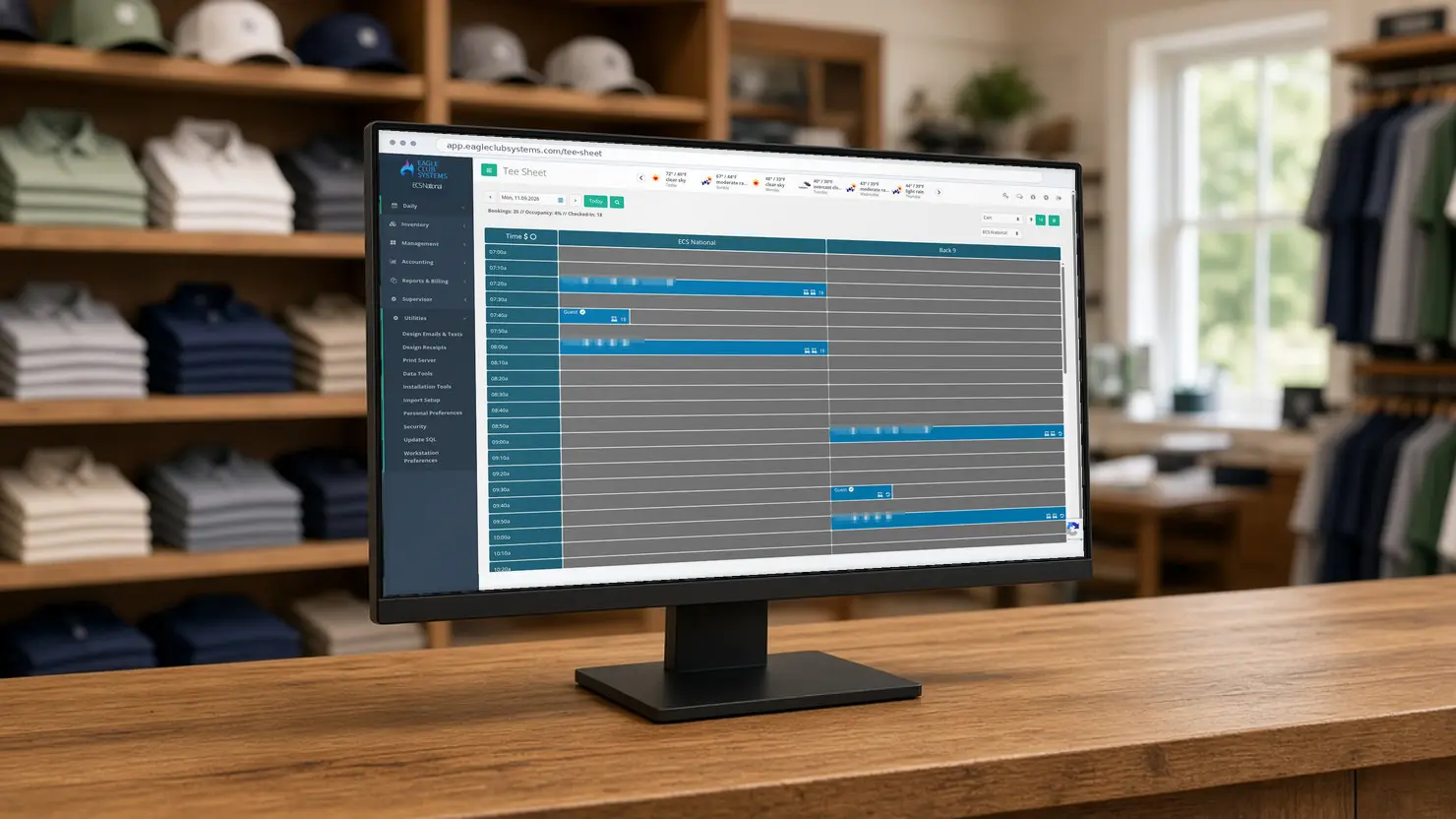
Cloud vs. legacy tee sheets: what actually changes
Many courses still run older server-based or locally installed tee sheets, or newer tools that bolt a web booking widget onto an older back office. Moving to a true cloud platform changes four things right away, and creates one trade-off you need to plan for honestly.
1. Browser access anywhere on the property
With a legacy server sitting in the back office, the tee sheet lives on the shop desktops. If you are on the starter shack, at home checking tomorrow’s frost-delay outlook, or in the grill room, you are out of luck or remoting into a slow terminal.
A cloud tee sheet like Eagle Club Systems runs in Chrome, Safari, Edge, or Firefox on common Windows or Mac desktops, laptops, tablets, and phones. No on-site server has to be maintained or backed up in a closet.
2. Real-time sync vs. “connected later”
Legacy setups often rely on scheduled syncs between the online booking portal, the tee sheet, and the POS. That is how rates drift, prepaid flags disappear, and customer profiles duplicate.
When the tee sheet, online booking engine, membership billing, and POS live on one cloud database, a booking made at 10:00 p.m. on a golfer’s phone is already on the starter’s screen at 6:00 a.m., with the right customer record and payment status attached.
3. Booking channels and measurement
Legacy tools rarely tell you what happened before a booking finished. In a modern cloud setup, you should check two things:
- Direct Google booking: Eagle Club Systems integrates with Google’s Appointment Redirect (Reserve with Google) so players can book straight from Google without detouring through a third-party marketplace.
- Funnel visibility: With Google Analytics 4 wired into the booking engine, you can see where golfers drop off. In our Thorn Apple Country Club case study, the club replaced decades on a paper tee sheet and cash register with Eagle Club Systems, watched GA4 booking metrics, and saw credit-card-hold abandonment drop from about 25% to about 15% after the policy was introduced while online booking grew from virtually zero to a majority of rounds.
4. The honest trade-off: internet dependency
Here is the part some cloud vendors gloss over. Because Eagle Club Systems is cloud-based, it requires an active internet connection and cannot operate entirely offline.
Before you sign with any cloud tee sheet provider, ask what happens if the clubhouse fiber line goes down on a Sunday morning. In practice, a mobile hotspot or LTE failover keeps the browsers online without losing your tee sheet. Ask to see how lightweight the connection requirement is, and never accept a vague “we work offline” claim without testing what happens to online bookings and card processing during an outage.
How the tee sheet affects revenue and rate control
A tee sheet should not force you to give up rate control or hand prime times to a third-party barter marketplace just to fill afternoons.
In your evaluation, check how rate rules work:
- Can you set day-part and occupancy-based pricing rules, or adjust rates by dollar or percentage (for example, using dynamic pricing tools like Eagle Rev IQ) without calling support?
- Can you keep member and resident pricing predictable while adjusting public rates for peak and shoulder windows?
- Can you configure prepaid vs. pay-at-course rules by day, time, or player type, and issue rain checks or credits cleanly?
Your tee sheet is also where golf course reporting starts. Utilization by hour, rounds by player type, cart attachment, and no-show patterns only stay reliable if every walk-up, phone call, and online reservation hits the same sheet.

Know the boundaries: tournaments, leagues, and hardware
A fair software evaluation checks what is native and what runs alongside the tee sheet.
- Tournaments and leagues: In Eagle Club Systems, tournaments and leagues are handled through third-party apps Golf Outing Guru and Golf League Guru sitting alongside the tee sheet rather than as a built-in native module. If leagues or outings are a major part of your week, make every vendor demo how standings, pairings, and billing touch the main tee sheet and POS.
- Hardware and peripherals: Confirm whether you can keep your existing computers and receipt printers (USB, Bluetooth, or Ethernet) or whether the vendor locks you into proprietary tablets.
- Implementation and contracts: Ask who converts your customer, member, and future-booking data, what it costs, and how long go-live actually takes. Eagle Club Systems includes implementation and data conversion at no charge, states there are no long-term contracts, and says most courses go live in under two weeks after data is provided.
Natalie Balallo at Crown Hill Golf Club in Williamsport, Ohio, put it plainly when talking about switching to ECS: Tyler and Brian went above and beyond with support and system knowledge when their course moved from its previous tee sheet and POS. That kind of transition only goes smoothly when someone converts your real data and trains your staff on your own rates.
A 10-point live test for your next tee sheet demo
Bring your real rate sheet and make the salesperson run through these live:
- Book an online tee time from a phone and watch it land on the desktop sheet immediately.
- Drag and drop a twosome into another pairing and update cart count.
- Check in a foursome with two different player types and one prepaid player in under 30 seconds.
- Ring a green fee, a bucket of range balls, and a shop item on the same ticket.
- Issue a rain check or credit and apply it to a future round.
- Change a rate rule for Tuesday afternoon without submitting a support ticket.
- Set or preview sunrise/sunset tee-time boundaries.
- Look up a customer’s play history, account balance, and prior POS purchases from their tee-sheet slot.
- Show how Reserve with Google or your website booking engine reports conversions and abandonment.
- Disconnect Wi-Fi and test your planned LTE/hotspot backup workflow.
If you want to compare side-by-side before scheduling demos, start on our comparisons hub, or book a demo and we will run all 10 tests with your actual rates.
FAQ
What should I look for first in golf tee sheet software?
Start with check-in speed, real-time inventory sync between online booking and the shop counter, rate and player-type controls, and a direct link to your golf POS and customer accounts. If the tee sheet and register live in separate databases, staff will lose time retyping names and fixing reports.
What is the main difference between cloud and legacy tee sheet software?
Legacy tee sheets typically run on an on-site server or sync in batches, limiting access to shop computers and creating mismatches with online bookings or POS. Cloud tee sheet software runs in a standard browser across desktops, tablets, and phones so the shop, starter, and online booking engine share live inventory.
Does cloud tee sheet software work without internet?
No. A true cloud platform such as Eagle Club Systems requires an internet connection and cannot run fully offline. Courses should keep a mobile hotspot or LTE failover ready so the shop stays online if primary internet drops.
Can golfers book directly from Google with Eagle Club Systems?
Yes. Eagle Club Systems integrates with Google’s Appointment Redirect (Reserve with Google) so players can find and book tee times directly from Google alongside your course website booking engine.
Does Eagle Club Systems handle golf leagues and outings natively?
Tournaments and leagues are handled through third-party integrations, Golf Outing Guru and Golf League Guru, working alongside the Eagle Club Systems tee sheet rather than as a native module inside the core tee sheet.
How long does it take to switch tee sheet software?
Most courses on Eagle Club Systems go live in under two weeks after providing their data, with implementation and data conversion included at no charge and no long-term contracts. Always confirm your data export format from your current vendor first.